
- Home
- TallyPrime integration
TallyPrime integration · Beta
TallyPrime integration for AawazAI
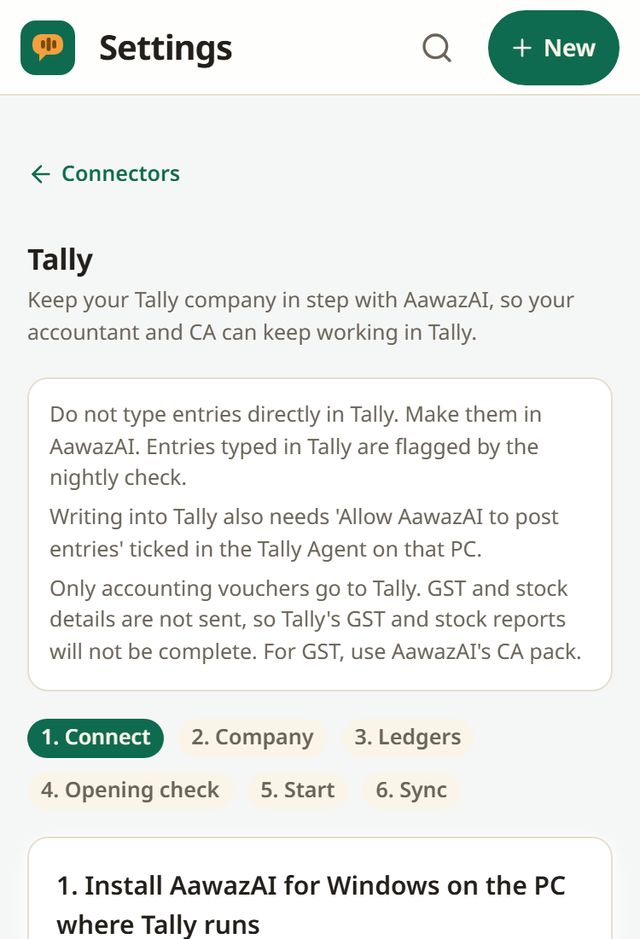
Make your entries in AawazAI. They go to your Tally company as accounting vouchers, so your accountant and CA can keep working in Tally.
What you need
A Windows PC where Tally already runs
- TallyPrime open on that PC, with your company loaded
- AawazAI for Windows, version 0.3.0 or later, from the Microsoft Store. The Tally Agent comes inside it
- The business owner sets it up; the accountant can match ledgers
- On the Tally PC, "Allow AawazAI to post entries" must be ticked before anything is written
This is in beta. If the Tally row is not under Settings, Connectors on your account, it has not reached you yet.
Setup
Six steps, each one visible
Connect
Open the Windows app on that PC and click Connect, or stay in the browser and enter a pairing code in the Windows app.
Company
Pick the Tally company and the date to send entries from.
Ledgers
AawazAI ledgers sit next to their Tally names. Confirm the match. A ledger with no match is created in Tally with our name.
Opening check
Opening balances are compared with Tally on the day before, ledger by ledger, and any difference is shown.
Start
You see how many earlier entries will go, then start.
Sync
Follow what is sent, waiting or needs attention.
What goes across
What syncs, and what does not
Know this before you switch it on.
| Item | What happens |
|---|---|
| Accounting vouchers | Sent to Tally as booked, with party ledgers bill-wise, so outstanding and ageing work there |
| GST lines | Sent as tax ledgers. Party GSTIN and place of supply are not sent, so Tally's GST reports will not be complete |
| Stock | Stock items are not sent. Stock moves go to a "Stock in Hand (AawazAI)" ledger, so Tally's stock reports will not be complete |
| Payments and receipts | Sent "On Account". Matching them to bills in Tally stays your accountant's step |
| GST documents | Use AawazAI's CA pack. No figure in it comes from Tally |
| Entries typed directly in Tally | Not brought back. The nightly check flags ledgers that changed outside AawazAI |
Your books in Tally
Coming from Tally?
Import from Tally
Bring a Tally company into AawazAI through the usual import preview. Nothing is saved until you confirm, and you can undo it.
File import
Prefer not to connect? Opening balances from a Tally export are also available in beta.
Branches and years
One line per branch and financial year. At year end, switch to the new year's company.
In your control
Every on has an off
- Pause and resume sending any time
- Disconnect: AawazAI stops sending, and entries already in Tally stay there
- The posting tick lives on the Tally PC, and its history shows in the app
Tally and TallyPrime are trademarks of Tally Solutions Private Limited. AawazAI is an independent product and is not made, endorsed or certified by Tally Solutions.
Questions
Tally, answered plainly
Does AawazAI replace Tally?
It can, or it can sit beside it. If your accountant or CA works in Tally, keep it. In that setup AawazAI is where entries are made and Tally is the copy.
Is the sync two-way?
Entries go from AawazAI to Tally. Importing from Tally into AawazAI is a separate step that you preview and confirm. Entries typed in Tally are flagged, not imported, by the nightly check.
Does Tally have to be open?
Yes. Keep Tally open with your company loaded on that PC, or entries wait until it is.
Which Tally versions work?
TallyPrime. The setup screen in the app says the same before you connect.
Can I use it without the Windows app?
You can run AawazAI in a browser, but the PC with Tally needs AawazAI for Windows, because the Tally Agent comes inside it.
Keep Tally, stop retyping
Your books are free to keep and free to leave with.